
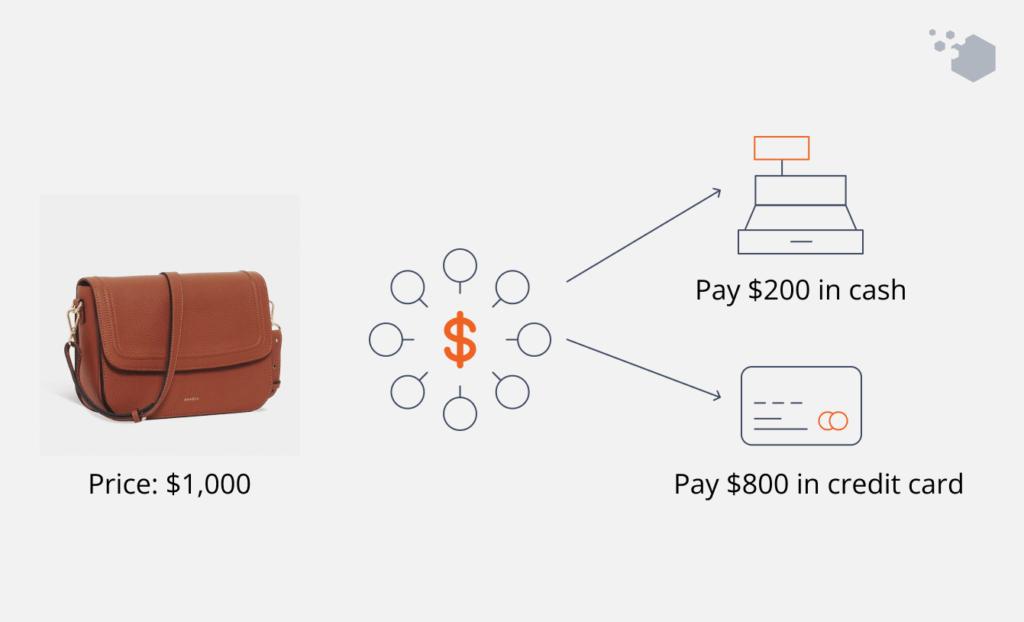
A prepaid card is easiest to use when its available balance comfortably covers the entire purchase. The situation becomes less straightforward when only a small amount remains on the card. A customer might have $18 available but want to buy something that costs $35. The obvious solution seems simple: use the remaining $18 from the prepaid card and pay the other $17 with another payment method.
That type of transaction is generally known as a split payment or split-tender transaction. Although the idea is straightforward, the checkout process does not always handle it automatically. The merchant needs to support splitting a purchase between payment methods, and the customer may need to know the prepaid card’s available balance before the transaction begins.
Understanding this process can make small remaining prepaid balances easier to manage and can also explain why a card with money still available might be declined for a larger purchase.
A prepaid card does not automatically use whatever balance remains
One common assumption is that a payment terminal will automatically take the available amount from a prepaid card and then ask for another payment method to cover the rest. That is not necessarily how the transaction is processed.
If a $50 purchase is submitted to a prepaid card containing only $30, the merchant may request authorization for the full $50. Because the card cannot cover that amount, the transaction can be declined rather than partially approved.
A split payment changes the process. Instead of asking one card to cover the entire purchase, the transaction is deliberately divided into separate amounts.
| Purchase | Prepaid balance | First payment | Remaining payment |
|---|---|---|---|
| $50 | $30 | $30 prepaid | $20 other method |
| $27 | $12 | $12 prepaid | $15 other method |
| $80 | $25 | $25 prepaid | $55 other method |
| $42 | $42 | $42 prepaid | None required |
The important part is that the first payment needs to be submitted for an amount the prepaid card can actually cover.
Knowing the exact available balance makes the process easier
Split payments work much more smoothly when the cardholder knows how much remains on the prepaid card. Guessing can create unnecessary declines. Suppose a customer thinks a card contains $20 when its actual available balance is $18.64. Asking the merchant to process exactly $20 may fail because the requested amount exceeds the available funds. Knowing the correct balance allows the first part of the purchase to be set accordingly.
This becomes particularly useful near the end of a prepaid card’s use. A card that originally contained $100 may have been used for several unrelated purchases, making the remaining amount difficult to remember without checking. Before attempting to spend the final balance, reviewing the card’s current available funds can therefore save time at checkout.
In-store checkout can make split payments relatively straightforward
Physical stores are often the easiest place to understand split tender because a cashier may be able to enter a specific amount for the first payment method. For example, a $64 purchase could be divided by asking to put $14 on a prepaid card and the remaining $50 on another accepted payment method. The first transaction is processed, the purchase balance decreases, and the customer then pays what remains.
The exact procedure depends on the merchant’s point-of-sale system and payment policies. Some checkouts make split tender easy, while others may limit which payment methods can be combined. For this reason, it is useful to tell the cashier about the split before presenting the first card rather than waiting for a full-balance transaction to be declined.
Online checkout is often less flexible
E-commerce creates a different problem. Many online checkouts are designed around one primary card payment for an order. The customer enters card details, and the system requests the full purchase amount.
If the prepaid balance is lower than the order total, there may be no field allowing the customer to specify that only part of the purchase should be charged to the card. Some online merchants support combinations involving store credit, gift balances or other payment options, but support for two general card payments is not universal.
This means a split payment that would be simple at a staffed retail checkout may not be possible through the same retailer’s website. Before building an online order around a small prepaid balance, customers should check which combinations the checkout actually supports.
Store gift cards and open-loop prepaid cards are not the same
Split payments can also become confusing because several products are casually described as gift cards. A store-specific gift card normally represents value that can be spent within a particular retailer or brand. Many retail systems are specifically designed to subtract that balance first and then request another payment method for whatever remains.
An open-loop prepaid card operates through a payment card network and can be accepted across many unrelated merchants where that card type is supported. At checkout, however, it may be processed more like a payment card than like the retailer’s own stored-value balance.
That distinction helps explain why a website might easily combine its own $10 gift card with another card while not offering the same workflow for two external payment cards.
Partial authorization and split tender are related but different
Another source of confusion is partial authorization. With partial authorization, a payment system may approve only the amount available on a card rather than declining the entire request. The merchant then needs another payment method for the remaining purchase amount. Split tender describes the broader situation in which multiple payment methods are used for one purchase.
The difference is largely about how the transaction begins.
| Method | What happens first |
|---|---|
| Planned split tender | Purchase is intentionally divided between payment methods |
| Partial authorization | Card may approve less than the full requested amount |
| Full authorization | One payment method is asked to cover the entire purchase |
| Declined transaction | Requested amount is not approved |
Support for these processes depends on the payment environment. Customers should not assume that every terminal or website will automatically perform a partial authorization when a prepaid balance is insufficient.
Restaurants can make the calculation less predictable
A straightforward retail purchase has a known total before payment. Restaurants can be more complicated because gratuities may affect the final amount. Trying to spend a prepaid card down to exactly zero while also leaving a tip can therefore require more care than using the same card for a fixed-price retail purchase.
A practical approach is to know the available balance and tell the merchant how much should be applied to that card. The remaining amount and any additional payment can then be handled according to the restaurant’s payment process.
Users should avoid assuming that the amount initially visible on a receipt is the only amount relevant to card authorization. Restaurant payment processing can vary, and sufficient available funds may still matter during authorization.
Small remaining balances are where split payments become most useful
A prepaid card with $200 available does not normally create a split-payment problem for a $25 purchase. The issue becomes more relevant when the balance has been gradually reduced.
Cards often end up with awkward amounts such as $7.43, $12.81 or $3.16. Those balances are large enough to be worth using but too small to cover many everyday purchases by themselves.
Without split tender, cardholders may be tempted to leave those amounts unused simply because finding an item priced at exactly the remaining balance is inconvenient.
A supported split payment solves that problem. The remaining value can contribute to an ordinary purchase rather than requiring the user to search for something that costs exactly $7.43.
A declined transaction does not necessarily mean the card is empty
When a prepaid card is declined for a purchase larger than its balance, it can be easy to conclude that no money remains on the card. That is not necessarily the case.
A $40 purchase submitted to a card containing $11 could fail because the authorization request exceeds the available balance. The same card might still successfully contribute $11 if the merchant supports a properly structured split transaction.
This is why checking the balance is more informative than using a decline as evidence that the card has reached zero. Recent pending transactions can also affect the amount currently available, so the usable balance may differ from what the cardholder remembers spending.
Multiple prepaid cards create another possible scenario
Someone may have several prepaid cards, each containing a small remaining balance. Combining them into one purchase sounds like an efficient way to use the funds, but the checkout system still needs to support multiple tenders.
At a compatible in-store terminal, a customer might be able to apply one prepaid card for a specified amount, then another, and finally use a different payment method for the remainder.
Online, combining several general-purpose cards is likely to be more restrictive because many checkout systems are designed around a single external card payment. The practical question is therefore not simply “Can these cards all pay for purchases?” but “Can this merchant divide one purchase across these payment methods?” Those are different questions.
Returns can become more complicated after a split purchase
Using two payment methods also affects what happens if the item is later returned. When a purchase was originally divided between payment methods, the merchant may return funds according to the original transaction structure and its refund policy. That means the entire refund should not automatically be expected on whichever payment method is most convenient at the time of return. Keeping the prepaid card after a split purchase can therefore be important, particularly when a return remains possible.
Throwing away a card immediately after its visible balance reaches zero may create unnecessary complications if part of a later refund needs to be associated with that original payment method. Receipts also become more useful because they can show how the original purchase was divided.
Split payments can be useful for deliberate budgeting too
The feature is not limited to clearing the final few dollars from a card. Some users may deliberately want to limit how much of a purchase comes from a particular prepaid balance. A card containing money set aside for entertainment, for example, could cover a predetermined portion of a larger purchase while another payment method covers the rest.
However, this works only when the merchant supports the necessary checkout structure. A budgeting plan should not depend on split tender at a merchant where the option has not been confirmed. This makes split payments a useful tool rather than a universal payment feature.
Checkout communication matters more than it seems
Many split-payment problems are not really card problems. They are checkout-sequence problems. Presenting a prepaid card without explaining the intended amount may cause the system to request the entire purchase total. Once that fails, the customer and cashier have to restart or adjust the transaction.
A clearer sequence is:
- Check the prepaid card’s available balance.
- Confirm that the merchant accepts split payments.
- Tell the cashier how much should be charged to the prepaid card.
- Process that portion first.
- Pay the remaining purchase balance with another accepted method.
- Keep the prepaid card and receipt if a return or adjustment may occur.
The exact steps can vary between merchants, but knowing the intended amounts before payment begins removes much of the uncertainty.
Online shoppers should check the checkout rather than assume
The increasing variety of digital payment options can make online checkout look more flexible than it actually is. A website may accept credit cards, debit cards, prepaid cards, digital wallets and store gift cards while still allowing only one external card per transaction. Displaying many payment logos does not automatically mean several of those methods can be combined for the same order.
If the goal is to use a small remaining prepaid balance online, checking the merchant’s payment help page can be worthwhile before spending time building an order. Where split tender is unavailable, another purchase or another merchant may be a simpler way to use the balance.
The last few dollars do not have to become stranded
One of the practical advantages of understanding split payments is that a prepaid card does not necessarily become useless when its balance falls below the price of most purchases. The remaining funds still have value. The challenge is matching that value with a checkout process capable of using it.
At merchants that support split tender, knowing the exact available balance and specifying the amount before payment can make it possible to use the card down to a very small remainder. At merchants that do not support it, especially some online checkouts, the same strategy may not work.
The key is to separate three questions: Does the card still have funds? Does the merchant accept the card? Does the checkout support splitting the purchase? A yes to the first two does not automatically guarantee a yes to the third. Once that distinction is clear, small prepaid balances become much easier to understand and manage.